Digital Scholarship Help

  • Get Started
    • Log In
    • Edit Profile
    • Add a Post >
      • Check Spelling/Grammar
      • Include Categories & Tags
      • Include Imagery
      • Include a Map
      • Include Links/Feeds/Embeds
      • Include Math, Charts, and Tables
  • Setup Your Site
    • First Steps >
      • 1. Get a Site
      • 2. Setup Your Site
    • Next Steps >
      • Menus
      • Plugins
      • Themes >
        • Theme Edits
      • Widgets
      • Jetpack Site Admin
    • Using Your Site >
      • Image Displays
      • Projects
      • Subsites
      • Restricting Page Access
      • Exporting Your Site
  • Share & Engage
    • Comments
    • Contacts
    • RSS Feeds
    • Press This
    • Social Media
    • Subscriptions
    • The WordPress Firehose
  • Learning Tools
    • Computer Platforms/Apps >
      • Concept Mapping
      • Flickr
      • Gephi
      • Twitter
      • Zotero
    • Mapping >
      • ArcGIS & QGIS
      • Creating Tours
      • Find Spatial Data via geo.lclark.edu
      • Georeferencing
      • GIS Datafile Hints
      • Google Mapping
      • Joining Data
    • Mobile Apps >
      • ArcGIS Apps
      • Fulcrum
      • Location-Aware Apps
      • PDF Maps
      • WordPress Mobile App
  • Some Examples
    • Effective Posts
    • Effective Sites
    • Effective Subsites
  • Get More Help
    • Get Support
    • DS Training & User Group
    • Training Outlines >
      • DS Training – Level 1 (Users)
      • DS Training – Level 2 (Admins)
      • DS Training – Level 3 (Network Admins)

Check Spelling/Grammar

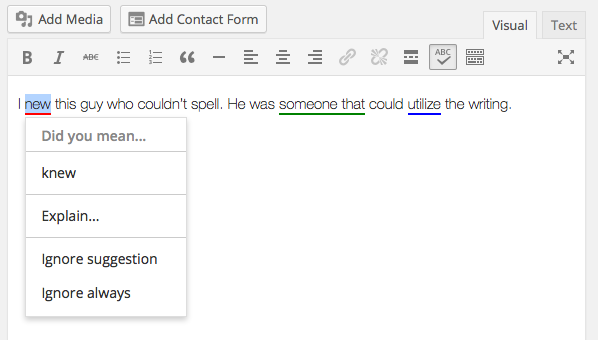
spelling2Would you like to check your post’s spelling and grammar? Just use the proofreading button! (If it’s not there, activate the Jetpack Spelling and Grammar module, or ask your site admin to do so.)

In the example at right, spelling goofs are underlined in red, grammar goofs underlined in green, and style suggestions underlined in blue.

Make sure to go to your profile to customize your proofreading preferences. See the Jetpack proofreading help page for details.

Digital Scholarship Multisite © 2018 · Lewis & Clark College · Log in